

Media Artist Contingency Plan

Does the US Secret Police not approve of your art? Are you a media artist who has gotten on the bad side of a private multinational corporation? Perhaps your government does not approve of the open source co-working tool that you host? Or maybe, you are simply just a troublemaker? Any which way, when Big Brother comes a-knockin’ on your door wanting to steal your computer, you need a contingency plan.

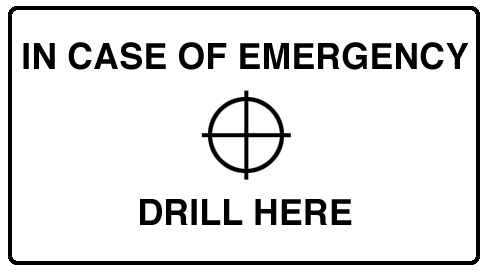
This informative little sticker will help guide you towards the quickest methodology of seriously damaging your laptop hard drive during that moment of urgency.

main1contingency

First of all, you will need to download one of these contingency plan sticker files. I recommend printing a full sheet and sharing them with friends and family:
Single Sticker
Sticker Sheet
1Bcontingency

Print out the file onto transparent adhesive full sheet labels.

2Ccontingency

Cut your sticker to size.

3Bcontingency

Research the build of your laptop and locate the position of your hard drive. You can use iFixit teardowns to locate the position of your hard drive in most popular laptop makes and models. The hard drive should look like a rectangular box with a centered circle somewhere upon it. In this case, it is in the bottom left corner.

(above photo courtesy of ifixit.com)

4Ccontingency

Adhere the sticker to your laptop such that the circular drill guide is positioned above your hard drive, but slightly off from the hard drive’s center. If you center it above where the hard drive should be, you might accidentally drill through the drive’s motor instead of the platters.

5Acontingency

If need be, and you are in a hurry, you can drill through the marked spot with a 1/4″ drill bit. If you have a minute on your hands, you may want to consider drilling an 1/8″ pilot hole and following up with a larger 3/8″ hole. If you have a couple of minutes on your hand, you may want to drill multiple holes.

Possible, alternate methods include sawing through the center of the sticker with a Sawzall or angle grinder.


COMMENTS

Now with moar speeling!

Randy Sarafan added these pithy words on Jul 12 11 at 5:56 pm

Don’t do it like this. If you-know-who comes a-knockin’, he’ll probably not let you drill for long.

Doing it right: Encrypt the drive.
Doing it very right: Also glue the BIOS + RAM to the board, set BIOS password -> byebye cold-boot attack.

Drahflow added these pithy words on Jul 12 11 at 7:48 pm

and to take things down a couple of levels, it would be a great design for panties or boxers.

A crass, but amusing way to promote the site.

Mags added these pithy words on Jul 13 11 at 4:43 pm

Apparently in Alabama actually doing that would be an admission of guilt to whatever they might decide to charge you with:

http://www.cunninghambounds.com/resources/wirtes/spoilation.html

Charles J. Cliffe added these pithy words on Jul 13 11 at 6:06 pm

Won’t do a damn thing. The DOD can extract data off of fragments of Hard Drives 1mm in size.

You can put your HDD in a shredder and they can still get data off it.

SeanB added these pithy words on Jul 13 11 at 7:17 pm

why drill through the screen, the sticker should be place is the right spot on the palmrest????

nycomputerguy2005 added these pithy words on Jul 13 11 at 7:43 pm

Agree with the above, a drill isn’t nearly enough. The Army used to (maybe still does?) use thermite for this sort of thing.

Encrypt the drive (OSX has this built in) and refuse to hand over the password and hope Apple didn’t do key escrow with the feds.

jet added these pithy words on Jul 14 11 at 6:30 pm

Would degaussing work? How about immersion in salt water? Physical destruction of HD disks will not prevent reassembly unless the data + FAT is altered. Virtual reassembly of tiny pieces would be straight forward. Comments anyone?

Mischief added these pithy words on Jul 16 11 at 6:18 pm

I think its more of a case of no duh it won’t *really* work.. but it makes a good point in relation to recent events and the future of this sort of thing you know everyone should have some contingency plan, its like those in case of fire etc..

sax added these pithy words on Jul 16 11 at 8:33 pm

Bonus points if the drive is spinning when you drill. Also, those who think one pass of writing zeros /low-level formatting /DBAN a drive won’t permanently make the data unrecoverable are misinformed. Google “The Great Zero Challenge”. Caveat emptor, the drill method won’t work with a solid state drive found in many newer computers.

Jesco added these pithy words on Jul 17 11 at 11:28 am

I love the combination of replies. Broadly, of course, in two camps, those that understand the joke, and those that dont.

Get with it people – this is meant as a bit of fun!!!

Mr S. Tyroo added these pithy words on Jul 18 11 at 6:28 am

Well said mr tyroo – some of those that have commented are so far divorced from reality that they cant see this as the joke that it so blatently is.

Mikey added these pithy words on Jul 18 11 at 7:33 am

throw the laptop in the microwave?

thom added these pithy words on Jul 18 11 at 1:20 pm

I get the joke but it’s still amusing and potentially useful information for people to have when disposing of hardware that may contain personal info.

thom added these pithy words on Jul 18 11 at 1:22 pm

To Mr S. Tyroo, et al: Once again, Randy’s sense of humor falls flat on its face.

Fred Flintstone added these pithy words on Jul 19 11 at 2:02 pm

This is a BAD idea. If you don’t believe me ask Mr. Hicks who was sentenced to 37 months for destroying his hard drive and impeding the investigation of Federal Child porn investigators. His sentence was upheld by the 4th Circuit Court of Appeals.
http://volokh.com/2011/07/18/destroying-hard-drive-leads-to-conviction-for-obstructing-federal-investigation/

Justin added these pithy words on Jul 19 11 at 5:30 pm

Why not just drill your brain? Let’s see them take your corpse to trial.

tudza added these pithy words on Jul 19 11 at 9:43 pm

For those of you not wedded to Apple products and have some reason to be paranoid, consider getting a notebook computer with a removable hard drive. For example, by removing one screw, the hard drive for the larger Lenovo notebooks can be pulled out, put into one’s pocket, and taken somewhere else for safekeeping/destruction.

James Li added these pithy words on Jul 20 11 at 4:53 pm

not really a good idea …

h4do added these pithy words on Jul 21 11 at 6:20 am

One word: TrueCrypt
Encrypt your drives with it and choose a random relatively long password.
Works better then the drill.
If “they come” for your digital assets just reset your PC and use your right “to say nothing”.
You should make a sticker that says “Encrypted – F’ Off Big Brother!”

Anony Mouse added these pithy words on Aug 02 11 at 8:03 am

Hilarious! Anything that smacks of defiance is a plus in my book. Privacy is golden.

Laura added these pithy words on Aug 03 11 at 4:26 pm

store and access any Sensitive infomation on a remonte computer, make sure you have some kind of password or destory the link to the control interface.

this is faster and less messy, plus it dosnet look like you been suspicious scene you did’nt had to destory or encrypt your data

Tip: to do this process with a click of a button, Compile a Bat that uses the Cmd.

phill added these pithy words on Aug 05 11 at 9:59 pm

what about kepping your important information on a SD card since they are alot easier to destroy and they can hold up to 64GB

http://www.centecequipment.com

tony added these pithy words on Aug 10 11 at 3:25 pm

how about release early, release often?

true digital privacy is sort of like snipe hunting…

dan added these pithy words on Aug 13 11 at 10:01 pm

Magnates how do they work?

tyler added these pithy words on Sep 07 11 at 3:16 pm

INCOMING LINKS

  1. Media Artist Contingency Plan: Drill a Hole in Your Laptop
  2. Protect Your Hard Drive Secrets With a Simple Sticker - Technabob
  3. Laptop Security Measure of the Day - TDW Geeks
  4. Protect Your Hard Drive Secrets With a Simple Sticker | Latest Technology News
  5. Laptop Stickers Show You Where To Drill To Destroy A Hard Drive In Case Of Emergency | The Daily Dose
  6. Emergency stickers tell you where to drill if you need to destroy your hard drive in a hurry - The Red Ferret Journal
  7. Sticker Pinpoints The Sweet Spot For Destroying Your Hard Drive
  8. Protect Your Hard Drive from the FBI With a Sticker? : Tek Bull
  9. Taaatüüü Taataa – hier muss der Bohrer im Notfall angesetzt werden - Euch, Festplatte, Laptop, Doch, Zuerst, Erinnerung, Sitz, Raum - ITler.NET - Der Blog für ITler und Sysadmins
  10. Worldshots › Adatainak törléséhez ide fúrjon
  11. BigBlueBowl
  12. Mental Transfer Relay » Media Artist Contingency Plan ~ stickers! place…
  13. Drill here | 81m80 5.0
  14. Need to destroy data? This sticker is a tickler | Journal of Technology and Economic Development | Future Technology | Green Technology | Military Technology | Business | Trading | Finance | Computer | Robots | Entertainment | Games | GPS | Software | Mus
  15. Need to destroy data? This sticker is a tickler « Netspeed Technology Blog
  16. Zaštitite osobne podatke bušilicom « Tipfeler… Backspace!
  17. En caso de emergencia, taladrar aquí | CyberHades
  18. Wenns schnell gehen muss – drill here! > lordmats heiterkeit!
  19. for when the Feds come knocking… – eep! – a blog
  20. DYSPEPSIA GENERATION » Blog Archive » Media Artist Contingency Plan
  21. High Technology » Blog Archive » Drill Here to Destroy Hard Drive
  22. Geek Actually Ep140 - The Hot-Can Experiment | Geek Actually
  23. The weird world of design » OWNI.eu, News, Augmented
  24. Emergency Kit for Art-Hacker | My Blog
  25. MatStace » Bookmarks for June 27th through August 24th
  26. Emergency Kit for Art-Hacker - Nerdcore
  27. Media Artist Contingency Plan « Silikon Junkeez Memory Dump
  28. In case of emergency – Drill here - blog.dasrecht.net
Return to Top

@fffffat

Facebook


Popular This Week::

Popular Today::

FAT Lab email newsletter:


TAGS::

Feeds